NSPanel-Easy
Add-on: Climate
Description
This add-on enables the use of your panel’s relays to act as a thermostat (either cooler or heater) using the internal temperature sensor and independent of the network availability.
Attention
- The NSPanel is limited to 2A per relay.
Don’t use it to directly power your cooler/heater if it exceeds the panel specifications:
- 150W/110V/Gang, 300W/110V/Total
- 300W/220V/Gang, 600W/220V/Total
- A target temperature must be set on the climate entity in Home Assistant or the page Climate in your panel.
[!NOTE] More details on the Sonoff NSPanel’s page and the product specifications document.
Installation
You will need to add the reference to addon_climate_heat, addon_climate_cool or addon_climate_dual files on your ESPHome settings in the package section
and after the remote_package (base code), as shown below (for heat in this example):
[!NOTE] Occasionally, ESPHome updates may result in the
entity_idof embedded thermostats being appended with_2. If you experience this change, refer to this forum post on the Home Assistant Forum for guidance.
substitutions:
  # Settings - Editable values
  device_name: "YOUR_NSPANEL_NAME"
  friendly_name: "Your panel's friendly name"
  wifi_ssid: !secret wifi_ssid
  wifi_password: !secret wifi_password
  ota_password: ""  # Optional: set OTA password, or use ${wifi_password} for backward compatibility (see migration guide)
  language: en      # Language code - see docs/localization.md for all supported codes

  # Add-on configuration (if needed)
  ## Upload TFT
  upload_tft_automatically: true

  ## Add-on climate
  heater_relay: "1"  # Possible values: "1" or "2"

# Customization area
##### My customization - Start #####
##### My customization - End #####

# Basic and optional configurations
packages:
  remote_package:
    url: https://github.com/edwardtfn/NSPanel-Easy
    ref: latest
    refresh: 300s
    files:
      - nspanel_esphome.yaml # Basic package
      # Optional advanced and add-on configurations
      # - esphome/nspanel_esphome_addon_climate_cool.yaml
      - esphome/nspanel_esphome_addon_climate_heat.yaml
      # - esphome/nspanel_esphome_addon_climate_dual.yaml
      # - esphome/nspanel_esphome_addon_cover.yaml
      # - esphome/nspanel_esphome_addon_display_light.yaml  # Show the display as a light in Home Assistant
Configuration
The following keys are available to be used in your substitutions:
| Key | Required | Supported values | Default | Description |
| :- | :-: | :-: | :-: | :- |
| cooler_relay | Mandatory for cool and dual | 1 or 2 | 0 (disabled) | Relay used to control the cooler. Use 1 for “Relay 1” or 2 for “Relay 2”. |
| heater_relay | Mandatory for heat and dual | 1 or 2 | 0 (disabled) | Relay used to control the heater. Use 1 for “Relay 1” or 2 for “Relay 2”. |
| temp_units | Optional | °C or °F | °C | Temperature unit used by everything the panel renders locally, not just this add-on. It is defined in the core package, so setting it here also changes the embedded temperature sensor and the Blueprint must be set to the same unit. See Localization. |
| min_off_time | Optional | Positive integer representing the number of seconds | 300 | Minimum duration (in seconds) the cooling/heating action must be disengaged before it may be engaged. |
| min_run_time | Optional | Positive integer representing the number of seconds | 300 | Minimum duration (in seconds) the cooling/heating action must be engaged before it may be disengaged. |
| min_idle_time | Optional | Positive integer representing the number of seconds | 30 | Minimum duration (in seconds) the idle action must be active before calling another climate action. |
| target_low | Optional | Number representing a temperature in the selected unit | 18 (°C) or 64 (°F) | The initial lower threshold for the target temperature. |
| target_high | Optional | Number representing a temperature in the selected unit | 24 (°C) or 75 (°F) | The initial higher threshold for the target temperature. |
| temp_min | Optional | Number representing a temperature in the selected unit | cool: 15 (°C) or 60 (°F)
heat: 7 (°C) or 45 (°F)
dual: 7 (°C) or 45 (°F) | The minimum temperature the climate device can reach. Used to set the range of the frontend gauge. |
| temp_max | Optional | Number representing a temperature in the selected unit | cool: 45 (°C) or 113 (°F)
heat: 35 (°C) or 95 (°F)
dual: 45 (°C) or 113 (°F) | The maximum temperature the climate device can reach. Used to set the range of the frontend gauge. |
| ~temp_step~ | Deprecated | ~Number representing a temperature in the selected unit~ | ~0.5~0.5 (°C) or 1 (°F) | ~The granularity with which the target temperature can be controlled.~ |
| cool_deadband | Optional | Number representing a temperature hysteresis in the selected unit | 0.5 (°C) or 1 (°F) | The minimum temperature differential (temperature above the set point) before engaging cooling. |
| cool_overrun | Optional | Number representing a temperature hysteresis in the selected unit | 0.5 (°C) or 1 (°F) | The minimum temperature differential (cooling beyond the set point) before disengaging cooling. |
| heat_deadband | Optional | Number representing a temperature hysteresis in the selected unit | 0.5 (°C) or 1 (°F) | The minimum temperature differential (temperature below the set point) before engaging heat. |
| heat_overrun | Optional | Number representing a temperature hysteresis in the selected unit | 0.5 (°C) or 1 (°F) | The minimum temperature differential (heating beyond the set point) before disengaging heat. |
- All values must be delimited with
"" - For more details on the keys, see ESPHome Base Climate Configurations and ESPHome Climate Thermostat - Additional actions behavior.
Modes
The climate page shows only the HVAC modes supported by the thermostat, based on its configuration.
With the default configuration, the heat add-on offers Heat and Off, the cool add-on offers Cool and Off, and the dual add-on offers Heat/Cool, Heat, Cool and Off.
If you customize thermostat_embedded to support more modes (e.g. auto_mode, dry_action or fan_only_action), the matching buttons are shown automatically.
Presets
The thermostat presets are available on the climate page through the preset button, which opens a list with the available presets.
ESPHome’s standard presets (Home, Away, Boost, Comfort, Eco, Sleep, Activity) come first, followed by your custom presets.
This list is built by the panel itself, so presets can be changed even while Home Assistant is unavailable.
By default, the add-on defines the presets Off and Home. See Climate custom presets to define your own.
Backup mode (local control only when Home Assistant is unavailable)
The optional addon_climate_backup package lets Home Assistant (or any other system) be the primary climate controller,
while the embedded thermostat takes over one or two relays only when Home Assistant is unavailable.
The embedded thermostat keeps running all the time on its normal relays (typically heater_relay: "0", a dummy relay),
so it has no effect while Home Assistant is connected.
When Home Assistant has been unavailable for longer than climate_backup_delay, the backup relays start to follow the embedded thermostat.
When Home Assistant is back, the backup relays are turned off and control returns to Home Assistant.
[!IMPORTANT] This package requires one of the climate add-ons (
heat,coolordual) to be included as well; otherwise ESPHome reportsSource for extension of ID 'relay_0' was not found. The backup relays must be different from each other and fromheater_relay/cooler_relay; this is checked at build time. The embedded thermostat must be left in an active mode (e.g. presetHome), otherwise there is nothing to mirror during an outage. The backup relay should be dedicated to this purpose. While the backup is active, any external change to it (e.g. from the hardware buttons) is reverted to match the embedded thermostat. A reboot restarts theclimate_backup_delaycountdown. Without Home Assistant, the panel reboots afterapi: reboot_timeout(60minin this project), and without Wi-Fi afterwifi: reboot_timeout(15minby default in ESPHome). If longer outages are expected, consider increasing these (or setting them to0s) in your local yaml.
| Key | Required | Supported values | Default | Description |
| :- | :-: | :-: | :-: | :- |
| backup_heater_relay | Optional | 0, 1 or 2 | 0 (disabled) | Relay driven by the heat action while Home Assistant is unavailable. |
| backup_cooler_relay | Optional | 0, 1 or 2 | 0 (disabled) | Relay driven by the cool action while Home Assistant is unavailable. |
| climate_backup_delay | Optional | Positive integer representing the number of seconds | 300 | Time without Home Assistant before the backup takes over. This also covers the time after a reboot. |
substitutions:
  ## Add-on climate
  heater_relay: "0"         # The embedded thermostat drives a dummy relay while Home Assistant is available
  backup_heater_relay: "2"  # Relay 2 is driven only when Home Assistant is unavailable

packages:
  remote_package:
    url: https://github.com/edwardtfn/NSPanel-Easy
    ref: latest
    refresh: 300s
    files:
      - nspanel_esphome.yaml # Basic package
      - esphome/nspanel_esphome_addon_climate_heat.yaml
      - esphome/nspanel_esphome_addon_climate_backup.yaml
Examples
Cooler
substitutions:
  # Settings - Editable values
  device_name: "YOUR_NSPANEL_NAME"
  friendly_name: "Your panel's friendly name"
  wifi_ssid: !secret wifi_ssid
  wifi_password: !secret wifi_password
  ota_password: ""  # Optional: set OTA password, or use ${wifi_password} for backward compatibility (see migration guide)
  language: en      # Language code - see docs/localization.md for all supported codes

  # Add-on configuration (if needed)
  ## Upload TFT
  upload_tft_automatically: true

  ## Add-on climate
  cooler_relay: "1"     # Possible values: "1" or "2"
  temp_units: "°F"      # Temperatures in Fahrenheit
  temp_min: "40"        # Min supported temperature is 40°F
  temp_max: "80"        # Max supported temperature is 80°F
  cool_deadband: "1.2"  # Temperature delta before engaging cooling
  cool_overrun: "1.2"   # Temperature delta before disengaging cooling

# Customization area
##### My customization - Start #####
##### My customization - End #####

# Basic and optional configurations
packages:
  remote_package:
    url: https://github.com/edwardtfn/NSPanel-Easy
    ref: latest
    refresh: 300s
    files:
      - nspanel_esphome.yaml # Basic package
      # Optional advanced and add-on configurations
      - esphome/nspanel_esphome_addon_climate_cool.yaml
      # - esphome/nspanel_esphome_addon_climate_heat.yaml
      # - esphome/nspanel_esphome_addon_climate_dual.yaml
      # - esphome/nspanel_esphome_addon_display_light.yaml  # Show the display as a light in Home Assistant
Heater
substitutions:
  # Settings - Editable values
  device_name: "YOUR_NSPANEL_NAME"
  friendly_name: "Your panel's friendly name"
  wifi_ssid: !secret wifi_ssid
  wifi_password: !secret wifi_password
  ota_password: ""  # Optional: set OTA password, or use ${wifi_password} for backward compatibility (see migration guide)
  language: en      # Language code - see docs/localization.md for all supported codes

  # Add-on configuration (if needed)
  ## Upload TFT
  upload_tft_automatically: true

  ## Add-on climate
  heater_relay: "1"     # Possible values: "1" or "2"
  temp_units: "°F"      # Temperatures in Fahrenheit
  temp_min: "40"        # Min supported temperature is 40°F
  temp_max: "80"        # Max supported temperature is 80°F
  heat_deadband: "1.2"  # Temperature delta before engaging heat
  heat_overrun: "1.2"   # Temperature delta before disengaging heat

# Customization area
##### My customization - Start #####
##### My customization - End #####

# Basic and optional configurations
packages:
  remote_package:
    url: https://github.com/edwardtfn/NSPanel-Easy
    ref: latest
    refresh: 300s
    files:
      - nspanel_esphome.yaml # Basic package
      # Optional advanced and add-on configurations
      # - esphome/nspanel_esphome_addon_climate_cool.yaml
      - esphome/nspanel_esphome_addon_climate_heat.yaml
      # - esphome/nspanel_esphome_addon_climate_dual.yaml
      # - esphome/nspanel_esphome_addon_display_light.yaml  # Show the display as a light in Home Assistant
Dual
substitutions:
  # Settings - Editable values
  device_name: "YOUR_NSPANEL_NAME"
  friendly_name: "Your panel's friendly name"
  wifi_ssid: !secret wifi_ssid
  wifi_password: !secret wifi_password
  ota_password: ""  # Optional: set OTA password, or use ${wifi_password} for backward compatibility (see migration guide)
  language: en      # Language code - see docs/localization.md for all supported codes

  # Add-on configuration (if needed)
  ## Upload TFT
  upload_tft_automatically: true

  ## Add-on climate
  heater_relay: "1"     # Possible values: "1" or "2"
  cooler_relay: "2"     # Possible values: "1" or "2"
  temp_units: "°F"      # Temperatures in Fahrenheit
  temp_min: "40"        # Min supported temperature is 40°F
  temp_max: "80"        # Max supported temperature is 80°F
  cool_deadband: "1.2"  # Temperature delta before engaging cooling
  cool_overrun: "1.2"   # Temperature delta before disengaging cooling
  heat_deadband: "1.2"  # Temperature delta before engaging heat
  heat_overrun: "1.2"   # Temperature delta before disengaging heat

# Customization area
##### My customization - Start #####
##### My customization - End #####

# Basic and optional configurations
packages:
  remote_package:
    url: https://github.com/edwardtfn/NSPanel-Easy
    ref: latest
    refresh: 300s
    files:
      - nspanel_esphome.yaml # Basic package
      # Optional advanced and add-on configurations
      # - esphome/nspanel_esphome_addon_climate_cool.yaml
      # - esphome/nspanel_esphome_addon_climate_heat.yaml
      - esphome/nspanel_esphome_addon_climate_dual.yaml
      # - esphome/nspanel_esphome_addon_display_light.yaml  # Show the display as a light in Home Assistant
Real Use Case Example: Water Underfloor Heating with NSPanel
The NSPanel works nicely as a replacement for existing water underfloor heating controllers, installed at eye level and often powered by 100-240VAC.
In my specific use case, the control valve is of the ‘normally closed’ type, meaning that an open relay indicates ‘no heating.’
I have utilized relay #1 for this purpose. It’s important to note that this setup does not act as a PID controller, but operates on a simple on-off mechanism.
The system initiates heating at a preset value below and turns it off at a value above the set point.
I have set these values to 0.1°C below and 0.1°C above the target temperature, respectively.
These adjustments have been effectively maintaining the desired temperature in all of our four rooms.
The thermostat’s settings range from a minimum of 15°C to a maximum of 22°C, with a granularity of 0.1°C for adjustments.
Furthermore, I have selected 18.3°C as the default target temperature.
 ##### addon-configuration - start #####
  ## addon_climate ##
  heater_relay: "1"  # Use relay 1
  temp_min: "15"
  temp_max: "22"
  heat_deadband: "0.1"
  heat_overrun: "0.1"
 ##### addon-configuration - end #####

climate:
  - id: !extend thermostat_embedded
    preset:
      - name: Home
        default_target_temperature_low: 18.3
        mode: "heat"
Please note that employing any filter to smooth the temperature readings, such as averaging, is discouraged if the relevant timescale exceeds 1min. Such filtering methods can delay the response times of an already slow underfloor heating system. Despite this, the temperature stability achieved is quite satisfactory, as illustrated in the graph below.
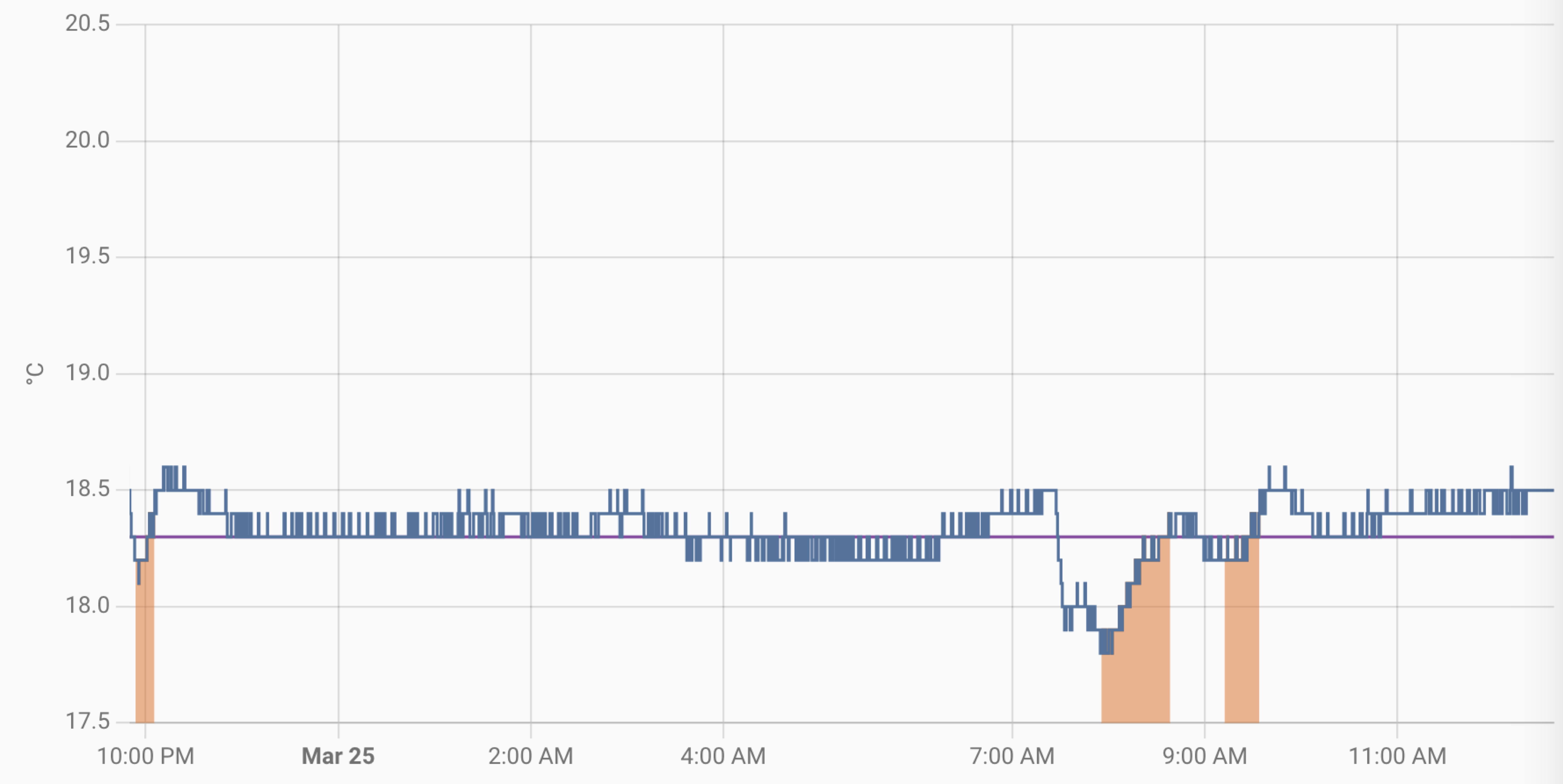 On March 24th (around 9:20 PM) and March 25th (around 7:30AM) a window was opened, and all heaters were set to ‘off.’ for 30 min